In this Kittl review, we break it down to see if it fits your design workflow. You don’t need Photoshop to make a good-looking design. If you’re making logos, t-shirt graphics, social posts, or print files, a browser-based tool can often do the job faster. Kittl is one of the more interesting options, so here’s what it does well, where it falls short, and who it fits.
Disclosure: This post contains affiliate links. If you sign up through them, I may earn a commission at no extra cost to you. I only recommend tools I think are worth your time.


What is Kittl?
Kittl is a browser-based design platform that specializes in typography-heavy graphics, vector illustrations, and print-ready designs. It also layers in AI features such as background removal, image generation, image vectorization, and smart recoloring.
I came across Kittl a few years ago, and I was skeptical at first about designing in a browser. But after trying it, I found there was a natural flow to using it. I’m not a pro by any means, but I love creating graphics for t-shirts and wall art prints, and that’s what I mainly use Kittl for. It seems to me they’re getting better every day, with more tools for all kinds of different workflows.
What Kittl does well
Typography. This is where Kittl stands out. Reviewers say it offers stronger typography tools than Canva, with several different text effects, which suits posters, logos, and shirt designs.
Beginner-friendly. The drag-and-drop interface and AI tools make quick work of mockups, logos, and social media graphics without needing design experience.
Print-ready output. It’s built for creators who sell or print their work, not just post online.
A usable free plan. The free plan gives you access to the full editor, core design tools, and a selection of templates, so you can test it before paying.
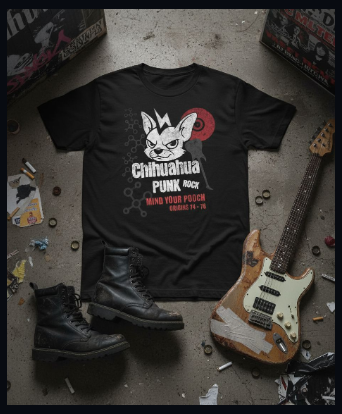
A few months back I created this in 20 to 30 minutes at most start to finish maybe even less lol I just remember it wasn’t long at all.
Where Kittl falls short
- Less control than pro software. One review notes it may not offer the same granular control and customization as other software. If you’re used to Illustrator, you’ll notice.
- Premium features cost money. The free plan is useful, but premium features and assets require a paid subscription.
- AI runs on tokens. Kittl uses a token system for AI features, so heavy AI use can mean paying more or watching your usage.
- Fewer templates than Canva. Reviewers say Canva has a larger template library, and some Kittl users also want more templates.
One honest frustration or limitation that I ran into was masking. I am still trying to figure that out! –
But it is probably, just due to me not knowing their process so I am still learning here too!
Kittl pricing
Kittl has a free plan plus paid tiers, generally Pro, Expert, and Business. Pro is aimed at creators who need to sell their work, Expert at power users who rely on Kittl as their main tool, and Business at teams that need shared seats and assets, with quote-based pricing.
Prices and token allowances change often, so check the current plans before you buy: Compare Kittl plans →
Kittl vs Canva
| Kittl | Canva | |
|---|---|---|
| Best at | Typography, vector, print-ready graphics | Templates, quick social content |
| Learning curve | Low to moderate | Very low |
| Template library | Smaller | Larger |
| Best for | Logos, shirts, posters, branding | Everyday marketing graphics |
[YOUR TAKE: which one do you reach for, and when?]
Who should use Kittl
A good fit if you:
- Make logos, shirts, or print-on-demand designs
- Want strong text effects without learning Illustrator
- Are a beginner or small business owner who needs polished results fast
Maybe skip it if you:
- Need advanced vector control and full creative freedom
- Mostly want a huge library of ready-made templates
- Need offline desktop software
Final verdict
For beginners and small creators who care about text-heavy, print-ready designs, Kittl is an easy tool to recommend, especially since you can try it free first. If you want deep professional control or lots of templates, you may prefer something else, and that’s okay.
FAQ
Is Kittl free? Yes, there’s a free plan with access to the editor and core tools. Premium features need a paid plan.
Is Kittl better than Canva? It depends on what you make. Kittl is stronger for typography and print designs, Canva for templates and quick social graphics.
Can I sell designs made in Kittl? Licensing rules depend on your plan and the specific assets you use, so read Kittl’s current license terms before selling.
Do I need design experience? No. It’s built to be approachable for beginners.